01 / Short answer
Addressable lighting is a data system and a power system at the same time. Identify the exact IC and wiring before opening the effects menu.
Builders configuring an addressable strip for local effects or a Home Assistant scene
CHECKPOINT / 01
Know what addressable means
An addressable strip contains control electronics that accept a data stream and change individual pixels or groups of pixels. That is different from an analog RGB or CCT strip, where the controller changes a shared channel. The wiring, controller profile, cut interval, current calculation and troubleshooting method all change. A strip that looks similar can still use a different protocol or channel order.
- Record the number of controllable pixels or segments, not only the physical length.
- Treat RGB, RGBW and RGBCCT as different channel layouts.
- Keep the light engine, controller and power supply as one documented configuration.
CURRENT PRODUCT RECORDS
24 V WS2814 RGBW addressable LED strip View productCHECKPOINT / 02
Read the strip before connecting data
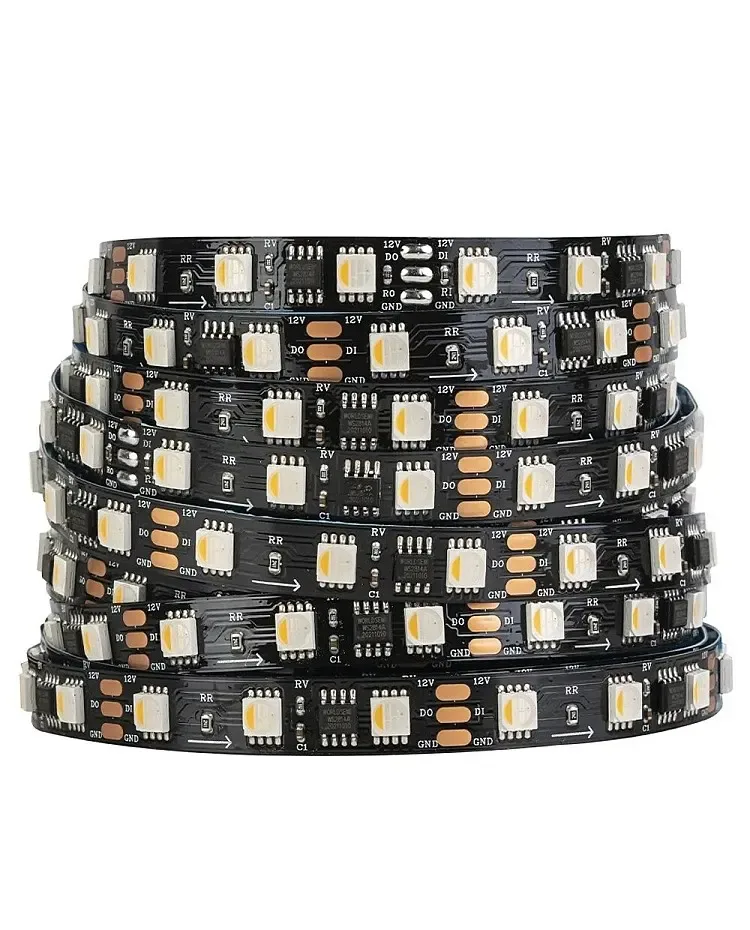
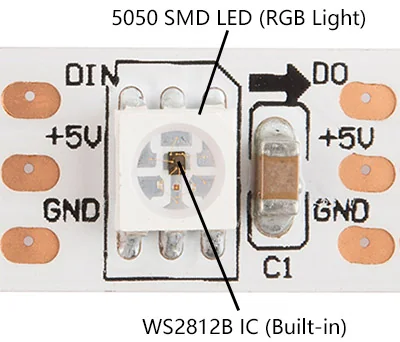
Find the voltage marking, IC family, arrows, data-in and data-out labels, cut marks, connector pinout and color order. The current LumaCircuit record linked below is a configurable 12/24 V RGBW WS2814 family; it is not a drop-in WS2812B replacement. The source article used a 5 V single-pixel example, so its concepts are useful for the inspection workflow, but its voltage and cut assumptions must not be copied to this product.
- Photograph the first segment and write down the exact variant.
- Do not infer IC compatibility from the controller name or from a three-pin connector.
- Keep the selected WLED LED type and color order in the handoff record.
CURRENT PRODUCT RECORDS
24 V WS2814 RGBW addressable LED strip View productCHECKPOINT / 03
Build a complete signal path
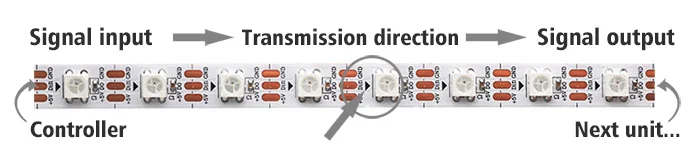
Connect the controller data output to the strip data input in the direction shown by the arrows. Share ground between the controller and the light engine, and keep the data cable away from avoidable noise and long unsupported runs. Level shifting, a resistor, a buffer or a differential link may be needed in some layouts; choose from the controller design and distance rather than adding parts by habit. Never use the source image or wire color as a universal pinout.
- Validate polarity with power removed.
- Label data input on every cut section.
- Keep connector gender and wire order in the project register.
CHECKPOINT / 04
Plan power separately from data
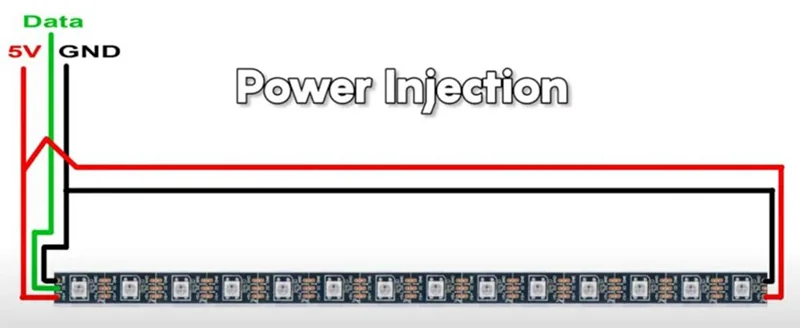
The data line can be correct while the strip still shows color shift, flicker or a dead far end because the power path is undersized. Calculate the declared maximum load, choose a matching voltage supply, protect each practical branch and measure at the strip under a repeatable bright state. A 5 V strip usually reaches its current and voltage-drop limits sooner than an equivalent 12 V or 24 V run, but the exact product data and injection layout control the result.
load_w = pixels * watts_per_pixel
supply_w >= load_w * 1.20
inject_and_fuse = based_on(cable + branch_current + distance)
CHECKPOINT / 05
Configure WLED with a short known-good section
Start with the smallest section and the correct voltage and LED type. Set the data pin, pixel or segment count and color order, then test solid red, green, blue and white before trying effects. Save the working profile with the hardware revision and firmware target. Add Home Assistant or show playback only after the local WLED path survives a restart and has a known recovery preset.
- Test one output and one segment before scaling.
- Use the exact IC profile; unknown chips remain chip-to-confirm until identified.
- Set a brightness limit that matches the power and thermal plan.
VISUAL REFERENCES
See the layers before you specify the parts.

FAILURE MODES
What usually goes wrong
- Data is connected to the output end of the strip.
- The WLED profile uses the wrong voltage family, pixel count, color order or channel count.
- Controller ground is omitted or a connector pinout is assumed from wire color.
- The power supply is large enough on paper but current still travels through a small pigtail or fuse branch.
- Effects are added before a solid color test and make a wiring fault look like a software problem.
TECHNICAL BASIS / VERSION
Keep the decision current
This guide is maintained as a versioned technical record. Recheck the current protocol documentation and the exact product revision before using it in a production installation.
Confirm the selected voltage, light engine, driver, controller, firmware and installation conditions against the product record and project brief.
FAQ / QUICK ANSWERS
Common questions about this lighting setup
Can any three-wire addressable strip use the same WLED setting?
No. Voltage, IC family, data timing, color order, channel count and controller output all matter. Confirm the exact variant and test a short section before scaling.
Is the current RGBW strip the same as WS2812B?
No. The current linked record is a configurable RGBW WS2814 family with 12/24 V options in its product record. It can be a related WLED example, but it should not be described or configured as a WS2812B strip.
Why does the first part light while the rest stays dark?
Check data direction, the cut and connector pinout first. Then check common ground, supply voltage, far-end voltage and whether a damaged section is interrupting data to the remaining pixels.
READING LIST
Reference points used for this guide
The page is rewritten for LumaCircuit readers. These references establish the original topic or technical context; they do not replace an exact product review or a LumaCircuit test record.
- Reference article / addressable LED strip basics
- WLED compatible LED strips