01 / Short answer
Give every layer one job: firmware renders or receives, a sequencer creates timing, a player owns playback, and transport carries the mapped data. A recoverable show starts with one owner for each output and a written contract between layers.
Display builders combining effects, sequencing and playback
CHECKPOINT / 01
Assign one owner to every layer and output
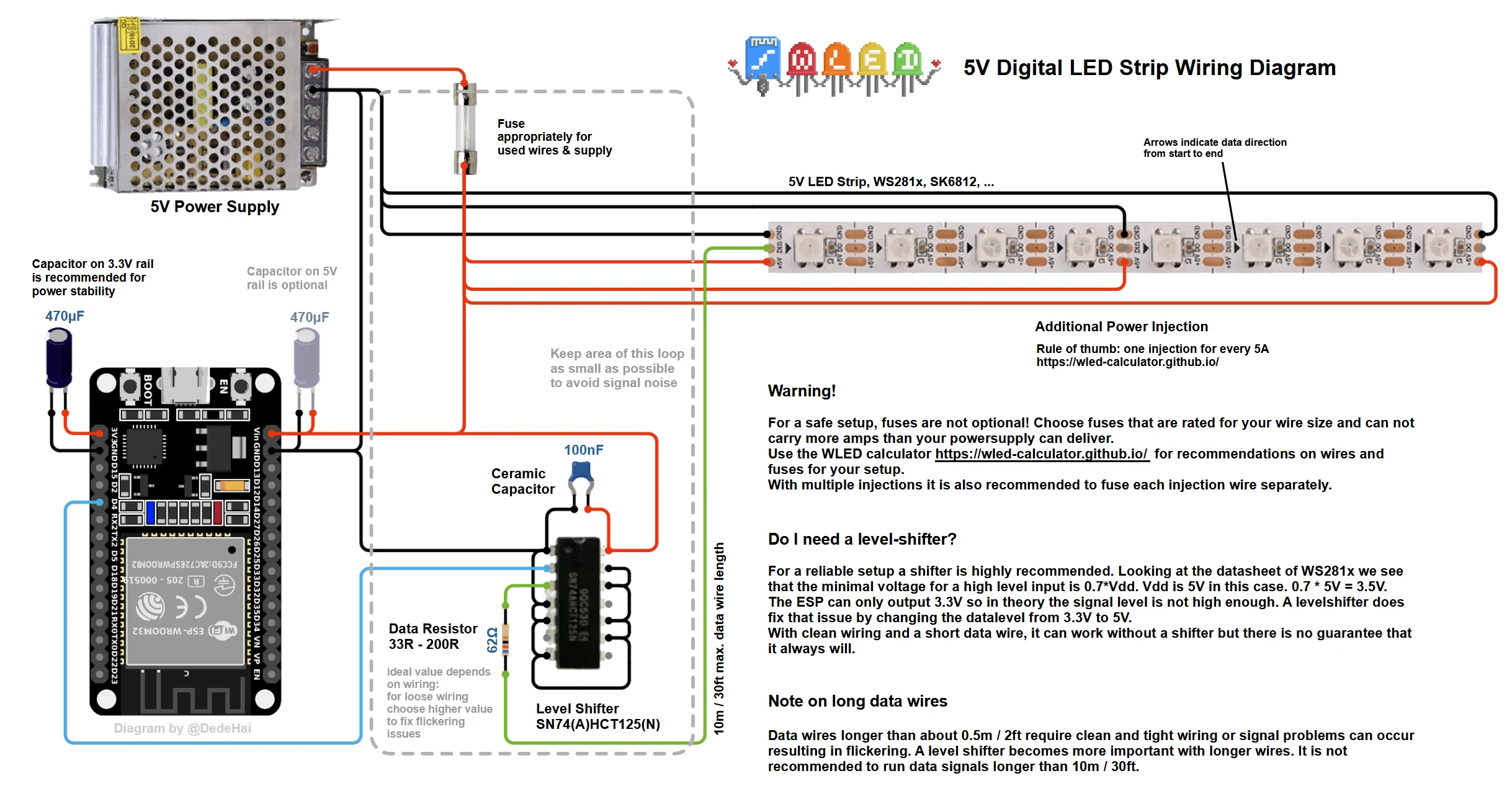
WLED can provide local effects or receive mapped data, xLights can define sequence timing, and FPP can own scheduled playback when the exact configuration supports that path. Network protocols carry data between layers; they do not decide which layer owns an output. Write one owner beside every output, preset, sequence and playback job.
- Name the system that may write each output during normal operation.
- Separate effect generation, sequence authoring, playback scheduling and transport.
- Do not let two publishers claim the same output unless the handoff is explicitly tested.
CURRENT PRODUCT RECORDS
24 V WS2814 RGBW addressable LED strip View productCHECKPOINT / 02
Freeze the pixel and mapping contract before authoring
Record the exact strip or light engine, physical pixel count, controllable address or group count, color order, voltage, controller output, receiver path, universe, start address, channels and target refresh. A sequence can look correct in software while the installed data order or grouping is different. Treat the mapping export as a versioned interface between the show file and the hardware.
- Version the mapping with the show, firmware and exact configured variant.
- Keep physical pixels, logical groups and network addresses as separate fields.
- Do not use a product title or a protocol name as proof of the mapping.
CURRENT PRODUCT RECORDS
24 V WS2814 RGBW addressable LED strip View productCHECKPOINT / 03
Choose transport and timing deliberately
DDP, E1.31, Art-Net and a controller protocol occupy different parts of the data path. Decide where timing is generated, which device receives the stream and how universe or channel boundaries are carried. The names are not interchangeable guarantees: the exact controller, receiver, firmware and show configuration must document or test the connection path.
- Record transport, universe, channel or address range and target frame rate.
- Keep one time source for the live path and document any scheduled handoff.
- Measure network load and refresh at the intended pixel count, brightness and scene complexity.
CURRENT PRODUCT RECORDS
24 V WS2814 RGBW addressable LED strip View productCHECKPOINT / 04
Design a service path that bypasses playback
A show is not serviceable if a failed player or network prevents a local light test. Keep a known-good WLED preset or other documented local mode, and define how to isolate one output, receiver or branch. Test network loss, player stop, controller restart, power recovery and return to the scheduled owner without leaving two systems active.
- Keep a local recovery path that does not depend on the complete sequence.
- Record the order for stopping playback and returning ownership to the controller.
- Separate data failure from power failure when diagnosing a dark output.
CURRENT PRODUCT RECORDS
24 V WS2814 RGBW addressable LED strip View productCHECKPOINT / 05
Commission from one output to the complete show
Start with one short known-good output and verify black, full white, colors, count, grouping, refresh and restart. Add the sequence, then playback, then more outputs one at a time. At every step compare the rendered result with the mapping, measure network and power behavior, and repeat the review when the strip, controller, receiver, firmware or show revision changes.
- Save a known-good checkpoint before adding the next layer.
- Test maximum requested brightness and the highest network load the show can create.
- Hand over the owner map, mapping export, recovery steps and exact tested configuration.
CURRENT PRODUCT RECORDS
24 V WS2814 RGBW addressable LED strip View productVISUAL REFERENCES
See the layers before you specify the parts.
FAILURE MODES
What usually goes wrong
- WLED and the show player both claim the same output without an explicit handoff.
- The sequence mapping does not match physical pixel order, grouping or color order.
- Transport, universe, channel and refresh limits are assumed from names instead of the exact path.
- Playback fails and no local mode can isolate the controller, receiver or power branch.
- A short effect test passes but full white, network load, restart or power recovery fails after scaling.
TECHNICAL BASIS / VERSION
Keep the decision current
This guide is maintained as a versioned technical record. Recheck the current protocol documentation and the exact product revision before using it in a production installation.
Confirm the selected voltage, light engine, driver, controller, firmware and installation conditions against the product record and project brief.
FAQ / QUICK ANSWERS
Common questions about this lighting setup
Should WLED, xLights and FPP all control the same output?
No. Assign one owner for each output at each operating stage. WLED may render local effects or receive data, xLights may define sequence timing and FPP may schedule playback, but the exact handoff and transport must be documented and tested. Do not leave two publishers active by assumption.
Do DDP, E1.31 and Art-Net prove that a controller will work with my show?
No. They describe transport layers, not complete compatibility. Confirm the exact controller, receiver, firmware, pixel variant, color order, universe or channel mapping, refresh and network path. A shared protocol name is not evidence that the complete connection is tested.
What should happen when the network or show player fails?
Use a documented local recovery mode that can isolate one output or branch, run a known-good test and return ownership to the intended controller. Test network loss, player stop, controller restart and power recovery before scaling the complete show.
READING LIST
Reference points used for this guide
The page is rewritten for LumaCircuit readers. These references establish the original topic or technical context; they do not replace an exact product review or a LumaCircuit test record.
- Architecture reference / show ownership, sequencing, playback and transport
- AusChristmasLighting community